Monster Font: A Cool, Cute, and Friendly Halloween Lettering Choice
Halloween is a time for creativity, fun, and spooky charm. Whether you're designing custom t-shirts, cards, mugs, or other merchandise, the right font can make all the difference in capturing that perfect festive vibe. Enter Monster, a Halloween-themed decorative font that’s both cool and cute. It strikes the ideal balance between playful and professional, making it a go-to choice for creators who want to add a touch of friendly fright to their projects.
What Is Monster?
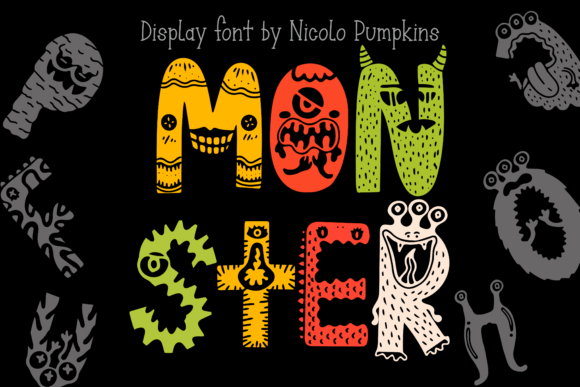
Monster is a decorative typeface inspired by Halloween imagery. Its design incorporates whimsical, slightly exaggerated characters with an approachable aesthetic that stands out without being over the top. The font combines elements like rounded edges, soft curves, and subtle monster-like motifs—think eyes, fangs, or ghostly touches—to give your text a unique seasonal flair.
This font is particularly popular among those creating Halloween-themed products such as:
- T-shirts and hoodies
- Stickers and tote bags
- Mugs and canvas bags
- Notebooks and greeting cards
- Party invitations and signage
Its versatility makes it suitable for both digital and print applications, and it works especially well when paired with bold colors like orange, black, and purple. For designers, small business owners, educators, and hobbyists alike, Monster offers a fresh way to elevate Halloween content while maintaining readability and visual appeal.
Common Mistakes When Choosing Monster
While Monster is an excellent option for many Halloween-related designs, there are some common pitfalls people often fall into when selecting and using it. These mistakes can impact the overall quality, clarity, and effectiveness of your final product.
1. Overlooking Readability at Smaller Sizes
Decorative fonts like Monster can sometimes lose legibility when used in smaller sizes. This is especially true if you're printing on items like mugs or stickers where space is limited. If the font becomes too cramped or stylized in these contexts, it may be difficult for viewers to read your message clearly.
Better Approach: Always test Monster at the intended size before finalizing your design. Use tools like online mockup generators or preview options in design software to see how it looks on different surfaces and scales. Consider simplifying the layout or increasing the spacing between letters if needed.
2. Using It Without Proper Pairing
Another mistake is using Monster alone without considering complementary fonts. While it's visually striking on its own, pairing it with a more neutral or sans-serif font can enhance contrast and improve the overall composition of your design.
Better Approach: Combine Monster with a clean, modern font for body text or secondary information. For example, use Monster for headlines and a simple font like Arial or Helvetica for descriptions. This creates a balanced look that’s both eye-catching and easy to digest.
3. Ignoring Licensing Restrictions
Some users download Monster without checking whether it’s appropriate for commercial use. Not all free fonts are permitted for selling products, which could lead to legal issues down the line if you're not careful.
Better Approach: Before downloading or purchasing Monster, always review the licensing agreement. Look for terms like “commercial use allowed” or “for personal use only.” If you plan to sell items featuring the font, ensure it comes with a license that supports that activity.
How to Get the Most Out of Monster
To truly leverage the potential of Monster, it’s important to understand how to apply it effectively across various mediums. Here are some tips and tricks to help you avoid missteps and maximize your results:
Test Different Color Combinations
The font’s playful nature shines brightest when paired with vibrant, Halloween-appropriate color schemes. However, some combinations might clash or reduce visibility.
Example: You might choose to print a Halloween mug with white text on a black background. While this looks great, the contrast may not be sufficient depending on the printer or material used. Try testing darker shades of orange or red against lighter backgrounds to maintain clarity and warmth.
Use It Sparingly for Maximum Impact
One of the most overlooked aspects of using any decorative font is knowing when to stop. Monster is best suited for short phrases, logos, or headings rather than long paragraphs of text. Overusing it can overwhelm the viewer and dilute the message you’re trying to convey.
Better Approach: Reserve Monster for key phrases or titles. Let simpler fonts handle the bulk of your content. This keeps your design from looking cluttered and maintains a professional tone even in a playful context.
Consider Kerning and Spacing
Because of its decorative nature, Monster may require manual adjustments to letter spacing (kerning) to look its best. Some letters might appear too close together or too far apart, especially in longer words or phrases.
Example: When designing a Halloween shirt with the phrase “Spooky Season,” you may find that the default spacing between 'y' and 'S' looks awkward. Adjusting the kerning slightly will make the phrase flow more naturally and look polished.
Match the Tone of Your Project
Though Monster is inherently cute and friendly, it may not suit every Halloween theme. For instance, a haunted house party invitation might benefit from a more ominous font style instead of something playful.
Better Approach: Assess the mood of your project before deciding on Monster. It works exceptionally well for family-friendly events, children’s Halloween crafts, or cozy autumn-themed products. If you need a scarier look, consider alternative Halloween fonts with sharper angles or eerie shapes.
Before You Commit: What to Check
Before you start incorporating Monster into your designs, take a moment to evaluate a few key factors. Doing so will help you avoid unnecessary rework and ensure your final product meets expectations:
- Check the License: Make sure the version of Monster you're using allows for the intended purpose (personal or commercial).
- Review the Format: Ensure the font file is compatible with your design software (e.g., .OTF or .TTF formats). Some platforms may not support certain types of files.
- Preview on Real Surfaces: See how the font appears on the actual product you're planning to print. Digital screens and printed materials can render fonts differently.
- Test Across Devices: If your design will be viewed online, check how Monster looks on various devices and screen resolutions. Avoid using it in web headers unless you have a web-safe version or a fallback font ready.
Monster vs. Other Halloween Fonts
When choosing a Halloween font, it's easy to get overwhelmed by the sheer variety available. Many fonts aim to capture the spooky essence of the season but do so in very different ways. Monster distinguishes itself through its blend of cuteness and coolness, avoiding the typical scary or ghoulish aesthetics found in other options.
For instance, fonts like “Frankenstein” or “Draculan” lean heavily into horror themes with jagged edges and dark tones. In contrast, Monster brings a softer, friendlier edge to Halloween, which can be more appealing to a wider audience—including kids and families.
If you're targeting a younger demographic or aiming for a lighthearted Halloween event, Monster is likely a better fit than a more intense, horror-focused font. Just be sure to align your choice with your brand identity and audience preferences.
Where to Find and Download Monster
There are several places to find Monster, including font marketplaces like Creative Market, Etsy, or Adobe Fonts. Each platform has its own rules regarding usage and licensing, so it’s essential to read the fine print before purchasing or downloading.
Here’s what to look for when sourcing Monster:
- Clear Licensing Terms: Confirm whether the font is free or paid, and if it permits commercial use.
- Font Formats Available: Choose a source that offers the format you need (.OTF, .TTF, etc.).
- User Reviews: Check customer feedback to gauge quality, compatibility, and reliability.
- Support and Updates: Some platforms offer updates or technical support, which can be helpful if you encounter issues during use.
Avoid downloading fonts from unverified sources, as they may contain malware or come with unclear licensing terms. Stick to reputable platforms that provide clear documentation and user ratings.
Monster in Action: Real-World Examples
Let’s look at a few practical examples of how Monster can be used creatively and effectively:
Custom T-Shirt Design
A local boutique sells Halloween-themed t-shirts and uses Monster for their main headline: “Candy Corn Dreams.” The font adds a cheerful twist to a classic treat, and the design includes a candy corn illustration to reinforce the theme. Customers love the friendly yet festive look, leading to increased sales and repeat orders.
Educational Halloween Craft Kits
An educator creates Halloween craft kits for elementary students and uses Monster on the instruction labels and packaging. The font helps keep the kits feeling engaging and age-appropriate, encouraging kids to participate in the activities with enthusiasm.
Social Media Graphics for a Blog
A lifestyle blogger promotes their annual Halloween post series using Monster in social media thumbnails and email headers. The font adds personality to the posts, helping them stand out in a crowded feed while still remaining readable and inviting.
Final Thoughts on Using Monster
Monster is more than just a Halloween font—it’s a tool for expressing creativity and capturing attention in a warm, inviting way. By understanding its strengths and limitations, you can use it effectively to enhance your designs without falling into common traps that compromise usability or professionalism.
Remember to always verify licensing, test at different sizes, and pair it thoughtfully with supporting elements. With these considerations in mind, Monster can become a valuable addition to your creative toolkit, helping you bring your Halloween ideas to life with charm and clarity.