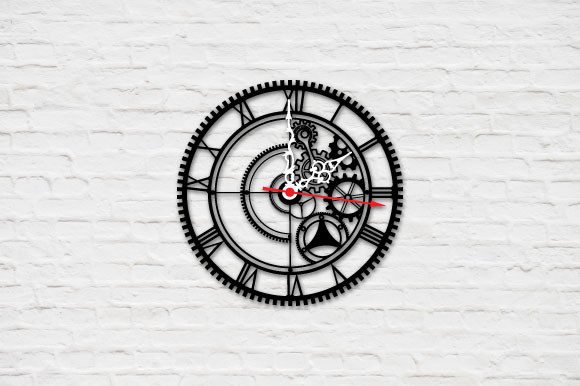
Decorative Wall Clock Laser Cut File
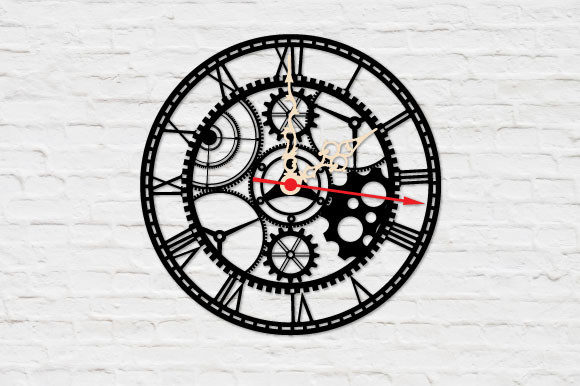
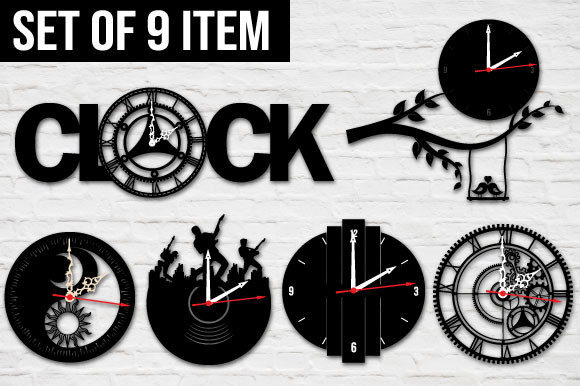
Decorative wall clock laser cut files are digital templates used to create stunning, personalized clocks with intricate designs. These files are typically made for use in laser cutting machines and allow users to bring unique artistic visions to life by transforming flat materials like wood, acrylic, or metal into beautifully detailed timepieces. Whether you're a DIY enthusiast, an artisan, or someone looking to add a custom touch to your home decor, these files offer a perfect blend of functionality and style.
What You’ll Get: SVG, EPS, PDF, and DXF Files
When you purchase a Decorative Wall Clock Laser Cut File, you’re not just getting one file format—you’ll receive multiple formats to suit your design and production needs. Typically, you’ll get:
- SVG (Scalable Vector Graphics): Ideal for vector-based editing in software like Adobe Illustrator or Inkscape. Great for customization and resizing without losing quality.
- EPS (Encapsulated PostScript): A versatile format that supports both vector and bitmap graphics. Perfect for high-quality printing and professional work.
- PDF (Portable Document Format): Easy to view and print, this format is great for quick reference and sharing the design with others.
- DXF (Drawing Exchange Format): Commonly used in CAD programs, making it suitable for precise engineering or woodworking applications.
All of these files are compressed into a single ZIP file, which means you’ll need to extract them using tools like WinZIP, WinRAR, or similar software before opening any individual file. This ensures all necessary components are included and organized for ease of use.
Why Choose a Laser Cut File?
Laser cut files provide several advantages over traditional methods of designing and manufacturing decorative items. They allow for precision, consistency, and repeatability—whether you’re making one clock for personal use or producing a batch for sale. With laser cutting, even complex patterns and shapes can be accurately reproduced, giving your project a polished, professional finish.
If you’re new to laser cutting, these files serve as a valuable starting point. They eliminate the guesswork involved in creating your own designs from scratch and give you a solid foundation to build upon. Plus, they’re compatible with most laser cutting machines, so you won’t need specialized equipment to start working on your project.
Who Can Benefit from Using These Files?
The appeal of a Decorative Wall Clock Laser Cut File is broad, catering to various audiences:
- Beginners: If you’re just getting started with laser cutting or CNC projects, these files make it easy to produce something beautiful without needing advanced design skills.
- Casual Crafters: For hobbyists who enjoy weekend DIY projects, having access to pre-made designs saves time while still offering room for creativity.
- Professional Makers: Artists and small business owners can use these files to streamline production and maintain quality across multiple pieces.
- Entrepreneurs: Custom wall clocks can be a profitable product line. Laser cut files help you scale up efficiently and consistently.
- Educators: Teachers and students can explore design and manufacturing concepts through hands-on learning with real-world applications.
No matter your background or skill level, these files empower you to create something special. And because they come in multiple formats, you have the flexibility to choose what works best for your workflow.
Practical Uses Across Different Settings
Decorative wall clock laser cut files aren’t just for home use—they can be adapted for many creative and commercial purposes:
- Home Decor Projects: Add a personal touch to your living space by crafting a custom wall clock with your favorite design elements. Think geometric patterns, floral motifs, or minimalist lines.
- Gifts and Keepsakes: Create one-of-a-kind clocks for birthdays, weddings, anniversaries, or housewarming gifts. Personalize the design with names, dates, or meaningful symbols.
- Commercial Products: Entrepreneurs can use these files to develop a line of handmade clocks for online stores, craft fairs, or boutique sales. The variety of file types makes it easy to adjust the design for different materials and sizes.
- Classroom Activities: Incorporate laser cutting into art or technology classes. Students can learn about design principles, material properties, and manufacturing techniques while making their own clocks.
- Event Decorations: Use decorative wall clocks to enhance event spaces like wedding venues, trade shows, or pop-up shops. They can serve as functional décor or photo backdrops.
These examples show how versatile and valuable laser cut files can be. Whether you're aiming for personal satisfaction or commercial success, the right design can open up a world of possibilities.
Design Flexibility and Customization Options
One of the biggest draws of using a Decorative Wall Clock Laser Cut File is the ability to customize it. Most files include layers or editable sections that let you modify the face, numbers, hands, or outer frame. You might want to change the color scheme, add engraving details, or adjust the size to fit your specific project requirements.
For instance, if you're creating a vintage-style clock, you could swap out the standard Roman numerals for Arabic ones or remove them entirely for a modern look. If you're using wood, you might paint or stain the design. With acrylic, you could layer colors for a stained-glass effect. The beauty of laser cutting is that it gives you the freedom to experiment and adapt the design to match your vision.
Getting Started with Your Laser Cut Clock Project
Here’s a simple way to begin using your Decorative Wall Clock Laser Cut File:
- Extract the ZIP file using software like WinZIP or WinRAR. Make sure all the included files are accessible.
- Open the SVG or DXF file in your preferred design software. Check if there are layers or parts that can be edited or removed.
- Customize the design to suit your taste. Change colors, fonts, or layout as needed.
- Export the final design in the correct format for your laser cutter.
- Prepare your material—common choices include birch plywood, acrylic sheets, or MDF—and load it into the machine.
- Run the laser cutter according to the settings provided or recommended for your chosen material.
- Assemble the clock using basic tools like glue, screws, or brackets. Install a clock mechanism and hang it up!
This straightforward process makes it easy to turn a digital file into a tangible, functional piece of art. It also helps reduce waste and errors, especially when compared to freehand drawing or manual cutting.
Things to Consider Before Choosing a File
Before diving into your project, it's wise to consider a few key factors to ensure your Decorative Wall Clock Laser Cut File meets your expectations:
- Material Compatibility: Check whether the design is optimized for the type of material you plan to use. Some cuts may require adjustments for thicker or thinner sheets.
- Machine Requirements: Confirm that your laser cutter can handle the file format you’ve selected. While SVG and DXF are widely supported, it’s always good to double-check.
- Design Complexity: More intricate designs may take longer to cut and require more precise handling. Beginners should start with simpler patterns and gradually move to more complex ones.
- File Quality: Look for clean, accurate lines and proper nesting of parts. Poorly designed files can lead to misalignment or unnecessary material use.
- License Terms: Understand if the file is for personal use only or if it allows commercial production. This is especially important if you plan to sell your finished clocks.
Taking the time to evaluate these aspects will save you headaches later and improve your overall experience with the file.
Real-World Examples of Laser-Cut Wall Clocks
To better understand how a Decorative Wall Clock Laser Cut File can be applied, here are some realistic use cases:
- A local furniture maker uses the file to create a set of wooden clocks featuring nature-inspired patterns for their shop. The clocks become a popular item due to their craftsmanship and uniqueness.
- A teacher introduces the concept of laser cutting to a group of students by having them design and assemble their own clocks using pre-made files. The activity sparks interest in STEM and design thinking.
- An entrepreneur sells custom clocks at a local market, using the laser-cut file to produce a consistent base design while allowing customers to choose different finishes and colors.
- A couple creates a personalized clock for their anniversary, incorporating engraved text and a family crest into the design. It becomes a cherished keepsake displayed in their home.
These scenarios highlight how laser-cut wall clock files can support both creative expression and practical goals across different fields and hobbies.
Maximizing Value with Multiple File Formats
Having access to SVG, EPS, PDF, and DXF files provides significant value. Each format has its strengths:
- SVG is excellent for editing and scaling in graphic design programs.
- EPS is preferred for professional printing and offers compatibility with a wide range of software.
- PDF is user-friendly and great for sharing or printing directly from common devices.
- DXF is ideal for technical applications and works well with CAD tools used in engineering and woodworking.
This variety means you can pick the best tool for each step of your project—from initial design tweaks to final production. It also makes the file useful beyond just the clock itself. For example, you might repurpose part of the design for other decorative objects or signage.
Where to Find and How to Use the Files
Many online marketplaces and design platforms offer Decorative Wall Clock Laser Cut Files for download. When shopping, look for packages that include clear instructions and previews of the final design. Reputable sellers often provide customer support or tutorials to help you navigate the file setup and assembly process.
Once you've downloaded and extracted the ZIP file, open the desired format in your design software. Review the layers, test the design with sample materials, and make any adjustments before committing to the full cut. Taking these steps ensures your final product looks exactly how you envisioned it.
Conclusion: Enhance Your Projects with Laser Cut Precision
Whether you're a beginner exploring new hobbies or a seasoned creator expanding your product line, a Decorative Wall Clock Laser Cut File can elevate your work. Its combination of aesthetic appeal, functional design, and technical flexibility makes it a powerful resource for anyone interested in crafting unique wall clocks.
By choosing the right file format and understanding how to prepare your materials and machine settings, you can unlock endless creative potential. So go ahead—download your ZIP file, extract it, and start turning your ideas into reality with precision and ease.